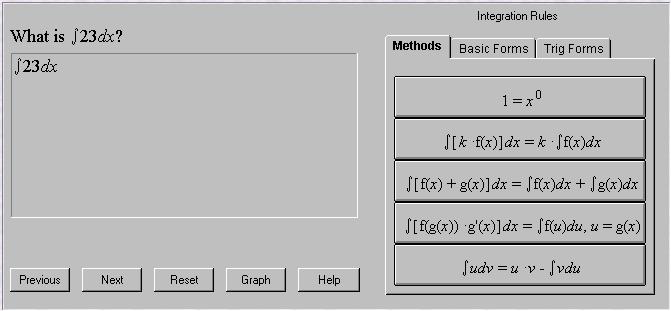
C-MED is an approach to teaching integration using a computer program. Instead of plugging in an integration equation and receiving an answer, the user must specify what integration rules to apply at each step.
Perhaps the easiest way to explain how to use the applet is to run through an example problem
This is the default state of the applet. The work area matches the question. Begin integrating by selecting the appropriate rule from the integration tool panel. In this case, there are two correct choices, both on the Methods panel; either Remove Constant Multiple, or Add x0. Both are correct, but for purposes of this example, Remove Constant Multiple was chosen.
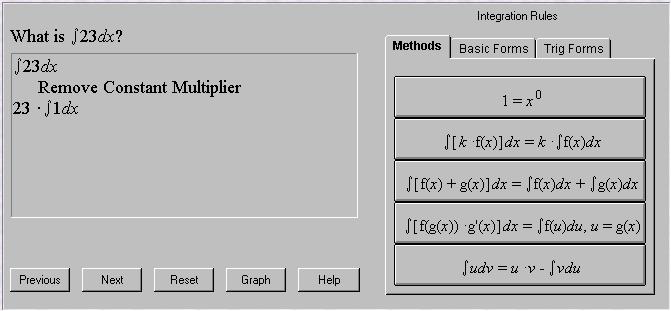
The equation is rewritten with the constant multiple removed. If an incorrect rule was chosen, the applet displays a message suggesting why this operation is inappropriate, and no operation is performed.
For example, the user might believe that it is now appropriate to apply the Power Rule to the problem. There is no variable in the equation at this time, however, and the applet points this out. The correct course of action is to Add x0
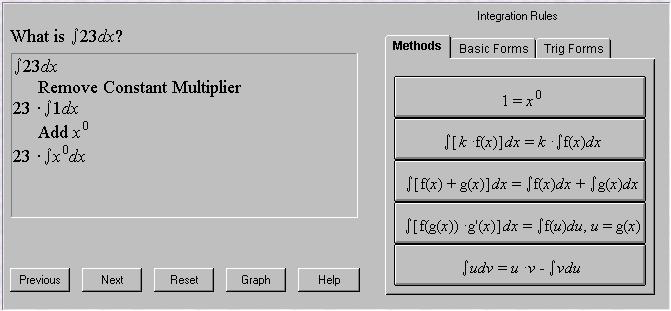
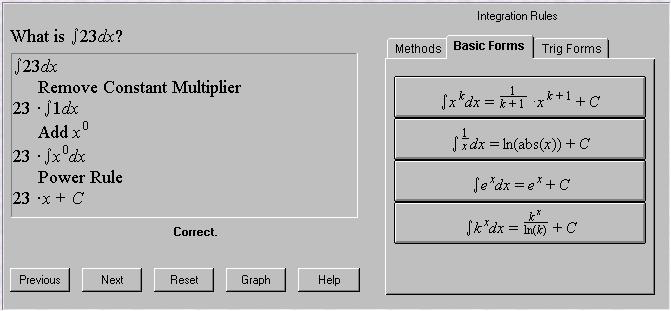
Now it is time to apply the Power Rule, and finish integrating
Best viewed with
